Have you ever wanted to sound like the Eurythmics? Future Music has a short little tutorial on copying the sound of "Sweet Dreams". These are always nice little videos because they can give you ideas on how to use plugins, even if you aren't copying the sounds. Check it out.

Showing posts with label Tutorial. Show all posts
Showing posts with label Tutorial. Show all posts
Monday, October 29, 2012
Eurythmics - Sweet Dreams (Are Made Of This) - Get That Sound
Have you ever wanted to sound like the Eurythmics? Future Music has a short little tutorial on copying the sound of "Sweet Dreams". These are always nice little videos because they can give you ideas on how to use plugins, even if you aren't copying the sounds. Check it out.


Tuesday, October 9, 2012
Excellent set of Ableton Live Tutorials via Future Music
Looking for new ways to get creative with Ableton Live? Future Music has you covered. They've uploaded some recent tutorials from their magazine as a free playlist on YouTube, so you can get a visual explanation of some great ideas, from DJing and sampling to MIDI tricks. Check out the playlist above.
Wednesday, April 18, 2012
Alex Metric In The Studio With Future Music
For those of you who don't know, Future Music Magazine occasionally put up old "In The Studio" features from their magazine on their YouTube page. For all you budding producers out there, this is an excellent opportunity to look into some of the working habits and workflows of great DJs, producers and artists. I'd recommend keeping an eye out on their YouTube Channel for these videos as they come out, and you can learn a great deal about production from them, free of charge. Above is In The Studio with Alex Metric. You can watch the second part after the break below.
Tuesday, April 17, 2012
Inside Synthesis - FM Synthesis Tutorial
Still haven't cracked the code of FM synthesis yet? Assuming you've read my tutorial or you just want a quicker explanation, Inside Synthesis has thrown together a nice video explaining some of the basic concepts of FM synthesis. This is actually a really great video for the basics, so you can get your head around some of the difficult parts. Inside Synthesis promises more videos on FM, so you'll have to be on the look out for those, too.
Monday, April 9, 2012
Moog Teaches You How to Use the Minitaur with Ableton
Moog has posted the first video of a three part series on how to use your Minitaur with Ableton Live. The video goes into detail about using your Minitaur with the VST plugin on your computer, and how to record one or multiple parts using the Minitaur. This is great for newcomers who've taken advantage of the Minitaur's low price point to add analog sounds to their otherwise digital production setup, initiating them on how easy it is to record a hardware synth. What's even more interesting is the VST is able to save presets for the Minitaur and recall them to the synth via MIDI, which is incredibly cool and useful. You don't have to worry about the presets on the synth-- they're stored right in the DAW like virtual patches. Be on the lookout for future videos, including one that's supposed to teach how to use the Minitaur as an external effects processor. Cool!
Bonus video: A happy new Moog Minitaur user's sounds, via Richard Schimitt on Youtube.
Bonus video: A happy new Moog Minitaur user's sounds, via Richard Schimitt on Youtube.
Tuesday, January 17, 2012
How To Make Skrillex's Summit Lead
I've been following YouTube user PhortySiks for some time now, checking out his videos where he breaks down how to make certain synth sounds (mainly rave and dubstep type stuff). He's actually pretty talented at getting it close, and he uses all soft synths from what I can see. Here he is making the new Skrillex track's lead in Massive. This is a pretty great track and features Ellie Goulding. Compare the PhortySiks' to the original below. I tried this sound out on a standard analog synth, and you can get pretty close as well.
Tuesday, January 10, 2012
SynthMania quick tip #3 - the 1980s bouncy octave bass
via MATRIXSYNTH
Ever wondered how to get easy 80s style bass octaves? This quick video from SynthMania showcases the easiest way to perform those classic bass octaves.
Wednesday, December 21, 2011
Vangelis Sound from the Little Phatty, via mik300z of YouTube
Like Vangelis? So do I. Recently YouTube user mik300z put up an excellent video showcasing a Little Phatty emulating the classic Vangelis sound made on the Yamaha CS80. If you're a Blade Runner fan, you'll love this. Since he go so many replies, he even recreates the patch so you can make your own at home. Check it out! And while you're at it, why not head over to his YouTube page or one of the video pages and thank him?
Wednesday, July 6, 2011
Patch Breakdown: The Prophet Piano
Today I'll be breaking down a patch for you guys. This was one of the original intentions of the site, so hopefully this will happen more often from now on, since patch building is essentially the heart of synthesis. You can have a great synth with crap sounds if you're not careful. I didn't create this sound but I'd like to start with it as a template to what the future of this will look like. Above is the Prophet Piano patch (No. 77 on my DSI Tetra) playing Mozart's Sonata in C (MIDI from this website). I think it's a decent stab at the sound of a real piano, and should be easily recreated on any number of synths. Hopefully this tutorial will give you a really great understanding of what is happening in this sound.

Friday, May 13, 2011
Exploring Presets: Drums
Drum Sounds Demo by The Synth Symp
You've probably heard this before, but drums are tricky. They're tough to figure out how to record, and tough to mix, and tough to have sound right. I'm going to give a little insight into getting you off the ground, however, and that is to USE YOUR PRESETS.
Wednesday, May 11, 2011
Building a sound: Modulation parameters
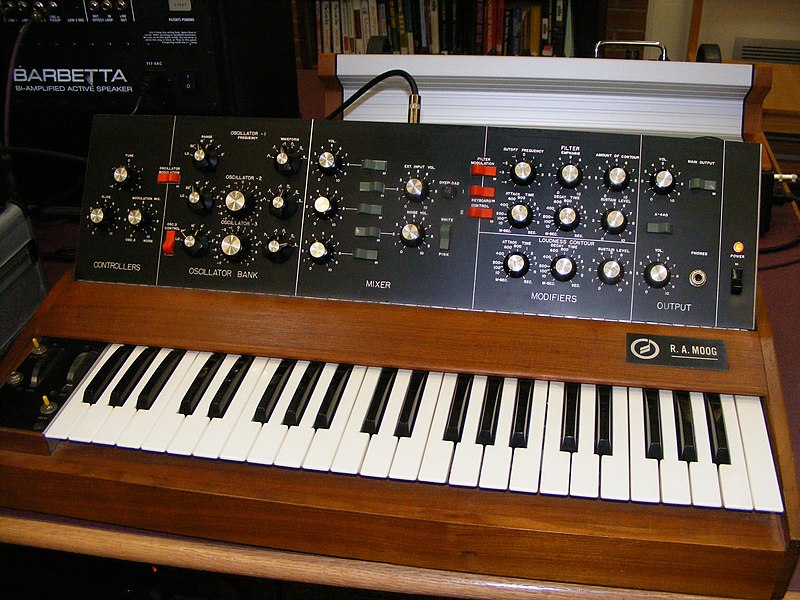
So after you've set up your wave and filter, and changed your amplitude envelopes, where do you go? There's still loads of complexity to put in your sound! Synthesizers generally have tons of modulation parameters. Here's a short list of some modulation elements:
Tuesday, May 10, 2011
Piano cut-ups: Helping you sound like your favorite new artist

Want to get crazy remix-type piano into your sound? Here's a short tutorial on a quick 5 minute approach. I'll be using Logic 9 for mac.
First, create a new track using an EXS sampler piano. You can actually use this technique for any sort of sound, but I will be demonstrating on a piano, as the demo shows below. Next, play some long chords, preferably some that work together. You can mix it up. In this example, I wasn't sure what key I was playing in, just picking some mid to low range chords. After you're finished, make sure they're all quantized so they attack together neatly. It also helps to have each note the same length to get a nice long chord sound. I gave each chord 2 bars to ring out. Next, click this new region, and go up to file and select export region as audio file. This will bring up the export dialog box, and you can name the sound whatever you want and place it in the bounces folder of the current project's folder. Next, find this exported audio in your finder, and drag it into a new track.
Monday, May 9, 2011
Building a sound: Filters
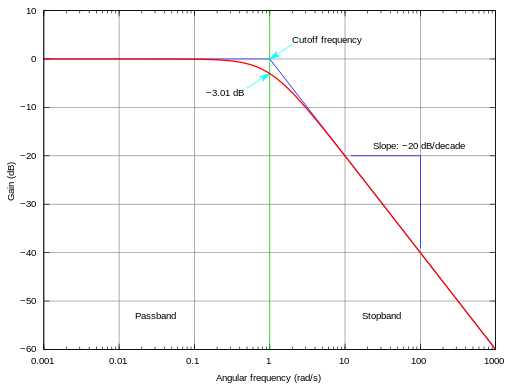
Sunday, May 8, 2011
FM Synthesis: A short beginner's guide


As many of you know, the Yamaha DX7 is often one of the first synthesizers you come across while searching for a well known, cheap vintage synth. The DX7 is not a usual synth, however; it uses a different form of programming called Frequency Modulation. FM synthesis is not the type of thing you can learn from just by fiddling with knobs, especially since the DX7 uses only one knob for a data input. Last summer I owned a DX7 for a couple of months and purchased a used book on how to program it from someone online. While I eventually sold the DX7 because I found the user interface for programming too difficult, I still use FM synthesis on my computer using Native Instrument's FM8, a solid program that offers visual representations of the waves you're using and a spectrogram of the different frequencies and their harmonic content. For tutorial purposes, I will be demonstrating on a browser based FM synth from Angry Octopus (who's more recently created the famous Webotribe, a browser based version of the soon to be released Monotribe).
Subscribe to:
Posts (Atom)